Built for the loop you run fifty times a day: see it, say it, hand it off.
Speech stays on your Mac.
Transcription, screen reading and note tidying all run on the Neural Engine. Models download once; nothing you say or capture leaves the machine.
Nemotron 3.5 Streaminglive text as you talk
Parakeet 110Mfastest · English
Cohere Transcribemost accurate
Apple Speechbuilt in · no download
Knows where you're pasting.
From a terminal, Capipaste copies your note, the text read off the screenshot and the image path, so Claude Code sees the error instead of swallowing your words. Everywhere else you get the image and the text.
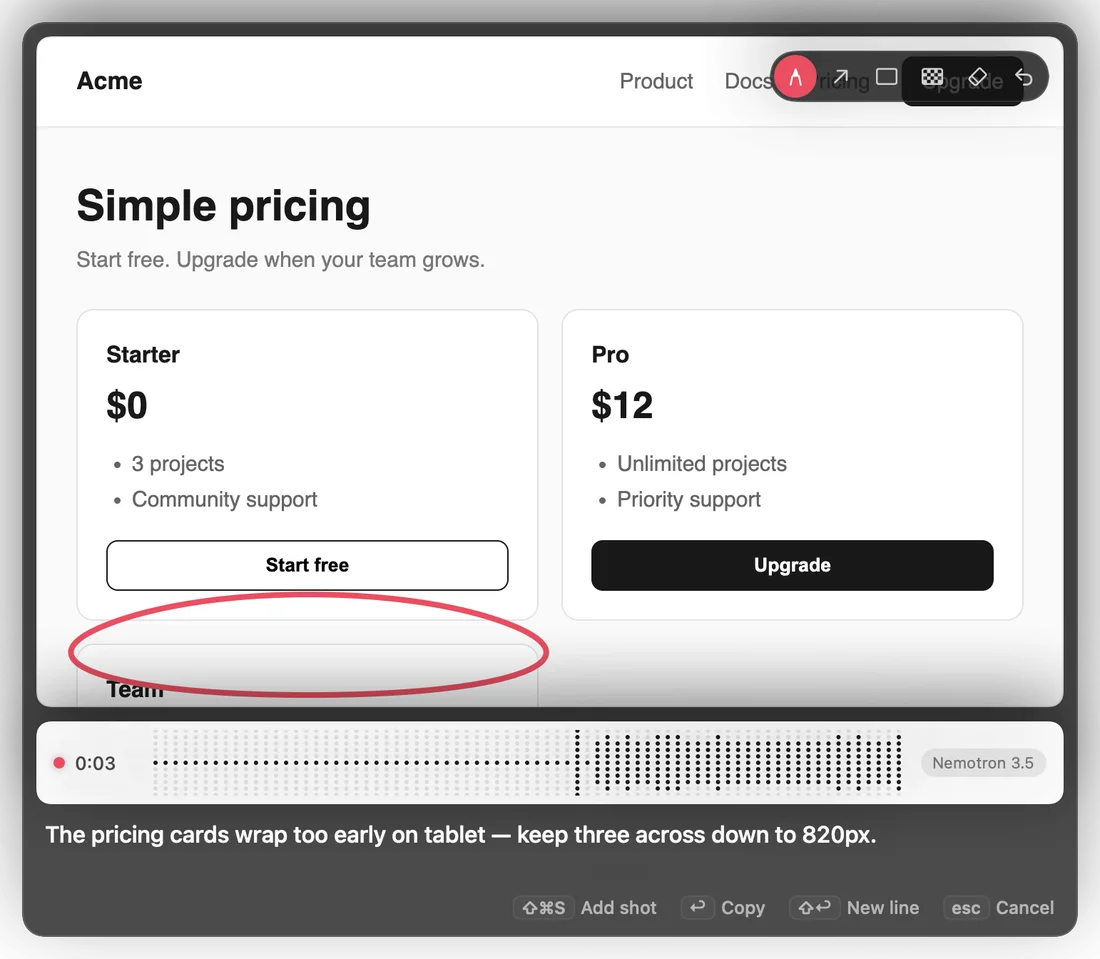
Ums out, meaning in.
"So the uh button, no wait, the header…" becomes one clear instruction, rewritten on your Mac. If a rewrite drops a detail, your own words go instead.
Pen, arrow, box, blur.
Point at the problem, then pixelate anything private before it leaves your screen. ⌘Z steps back one mark at a time.
Clips for what moves.
⌃⌘S records a region for up to 30 seconds. Draw on the first frame; the note carries frames from through the clip for agents that can't watch video.
Every capture is kept.
PNGs and notes are saved to ~/Pictures/Capipaste. The menu lists recent captures to copy again, and ⌃⌘V pastes the last one wherever you are.