Capipaste's dotted acorn mascot, turning in place and talking
Collaborate quicker

Screenshot. Say it. Paste it.

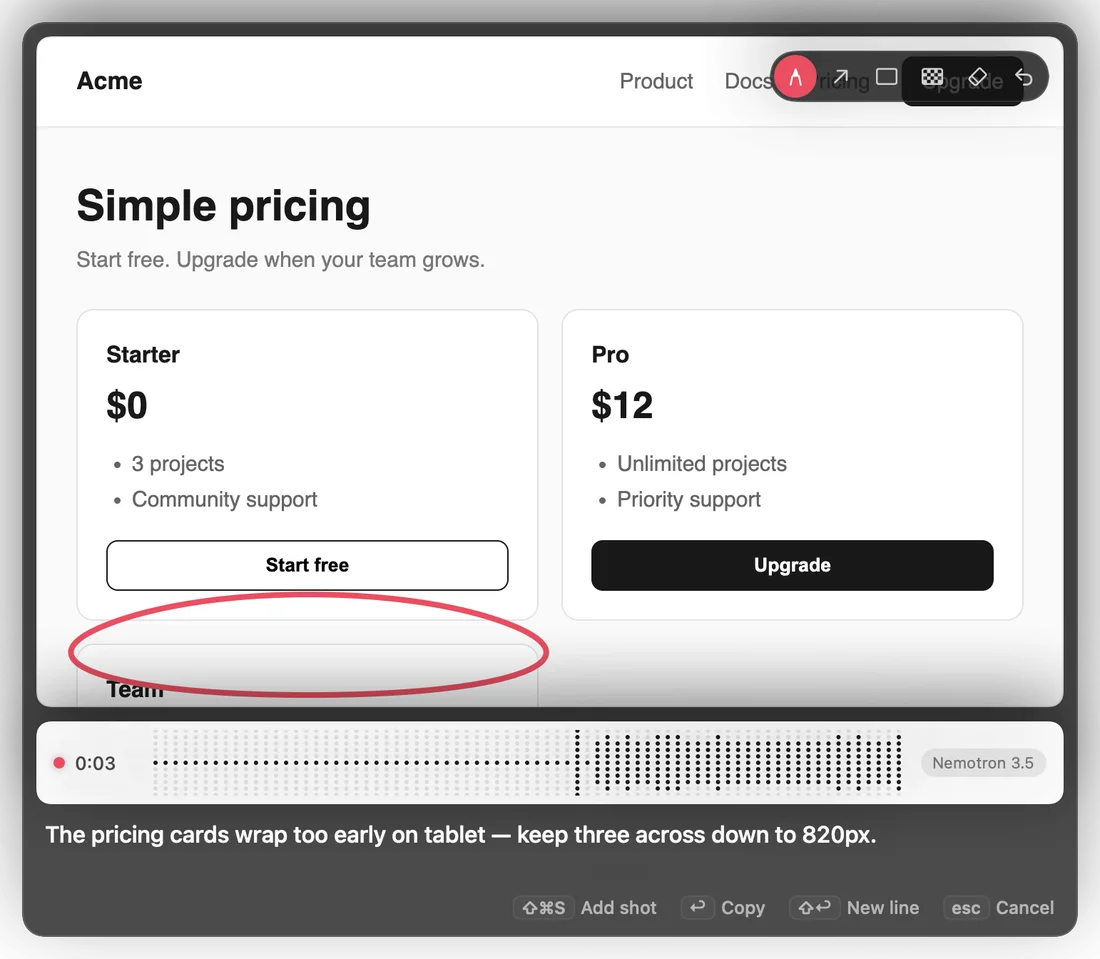
Press ⌘ ⇧ S, drag over the problem and say what should change. Capipaste puts the marked-up screenshot and your words on the clipboard for Claude Code, Codex or any chat.

Latest release · Apple Silicon · macOS 26 · free

Also on Windows and Linux — preview build: capture, mark up, copy, no voice notes yet.
Windows installer · Linux AppImage · Linux .deb · source

Capipaste is a Mac app. Send yourself the link and open it there.

First open: macOS asks you to confirm an app from outside the App Store. Here's how, or skip it with Terminal:

01

Three keys between you and a clear bug report.

Step 1 · ⌘⇧S

Drag over what's wrong.

The native macOS picker opens. Drag a region, or press Space to grab a whole window. Esc backs out.

Step 2 · talk

Say what should change, circle where.

A card opens with your screenshot and starts listening. Draw on it while you talk. Your words appear as text, transcribed on your Mac.

Step 3 · ↩︎

Paste it where the work happens.

Return stops recording, copies the image and your note, and puts you back in the app you came from. ⌘V.

02

Small app. Every edge filed down.

Built for the loop you run fifty times a day: see it, say it, hand it off.

Speech stays on your Mac.

Transcription, screen reading and note tidying all run on the Neural Engine. Models download once; nothing you say or capture leaves the machine.

Nemotron 3.5 Streaminglive text as you talk
Parakeet 110Mfastest · English
Cohere Transcribemost accurate
Apple Speechbuilt in · no download

Knows where you're pasting.

From a terminal, Capipaste copies your note, the text read off the screenshot and the image path, so Claude Code sees the error instead of swallowing your words. Everywhere else you get the image and the text.

Ums out, meaning in.

"So the uh button, no wait, the header…" becomes one clear instruction, rewritten on your Mac. If a rewrite drops a detail, your own words go instead.

Pen, arrow, box, blur.

Point at the problem, then pixelate anything private before it leaves your screen. ⌘Z steps back one mark at a time.

Clips for what moves.

⌃⌘S records a region for up to 30 seconds. Draw on the first frame; the note carries frames from through the clip for agents that can't watch video.

Every capture is kept.

PNGs and notes are saved to ~/Pictures/Capipaste. The menu lists recent captures to copy again, and ⌃⌘V pastes the last one wherever you are.

  • Several shots, one note. ⌘⇧S again while the card is open.
  • Hold to talk. Hold right ⌘ anywhere; the words paste where you were typing.
  • Your words. Add useEffect or project names once and they come out spelled right.
  • Says where you were. App, window title and page URL go in the note.
  • Asks again. A failed transcript retries, then the card asks you to repeat it.
  • Pinch to zoom. Marks land exactly where you drew them.
03

One capture, wherever the work is.

04

Specs.

System
macOS 26 on Apple Silicon. Windows 10/11 and Linux run the preview build.
Lives in
The menu bar. No Dock icon, no window until you capture.
Capture
Native region and window picker
On-device
Speech (FluidAudio or Apple Speech), screen text (Apple Vision), tidy (Apple Foundation Models, or Qwen 3.5 2B)
Clipboard
PNGs + text, or text with [screenshot: path] for terminals
Permissions
Microphone, Screen Recording; Accessibility for hold-to-talk and window titles
Network
Only to download a model you pick
Shortcuts
⌘⇧S capture · ⌃⌘S clip · ⌃⌘V paste last
↩︎ copy · ⇧↩︎ new line · esc cancel
D pen · A arrow · B box · X blur
E erase · ⌘Z undo
⌘+ ⌘− ⌘0 zoom

Free, open source, and one shortcut away.

Latest release · Apple Silicon · macOS 26 · free

Also on Windows and Linux — preview build: capture, mark up, copy, no voice notes yet.
Windows installer · Linux AppImage · Linux .deb · source

Capipaste is a Mac app. Send yourself the link and open it there.

First open: macOS asks you to confirm an app from outside the App Store. Here's how, or skip it with Terminal: